

Finding a comfortable Plane Seat Plan is not as simple as “window or aisle”. Some seats have limited recline, missing windows, misaligned windows, noisy galleys or lavatories behind them, or limited legroom because of boxes or equipment under the seat.
Airline apps usually only show which seats are free or paid, but they rarely tell you:
- Which seats are actually more comfortable
- Which ones have extra legroom or restricted recline
- When a better seat opens up later
That’s where third‑party seat map tools come in. They show detailed layouts, live availability, and even seat quality ratings or alerts.
This article explains the main tools that help you with seat selection, what information each one provides, and which tools are worth using depending on how you travel.
1. ExpertFlyer | Live Seat Maps & Seat Alerts for Serious Travelers
Platform: Web (mobile-friendly), subscription, some free functions
Best for: Frequent travelers who care about specific seats and upgrades
ExpertFlyer is a powerful tool built for frequent flyers and travel hackers. It’s known not only for award searches, but also for seat maps, seat alerts, and real‑time seat data.
1.1 What Info ExpertFlyer Gives You
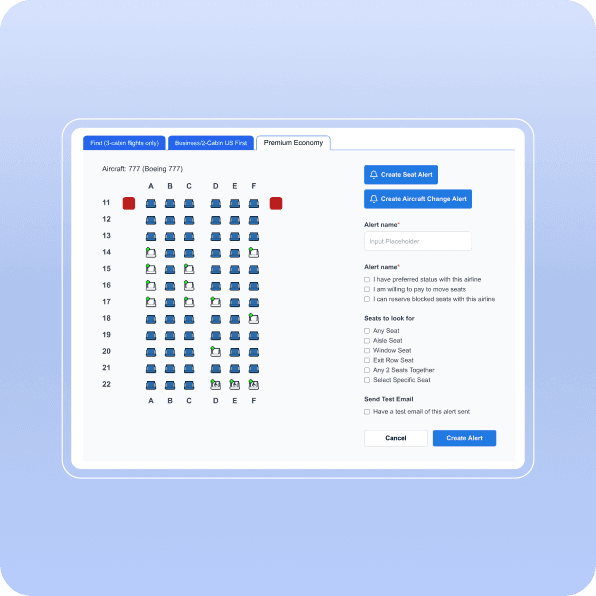
- Real-time seat maps for your exact flight
You can access seat maps and “see which seats are open on your flight in real time”.
That means:- You enter your flight number and date
- It shows the actual seat map with seats marked as:
- Available
- Occupied
- Blocked (e.g. for crew, elites, families)
- Different seat configurations on the same aircraft
It’s “particularly valuable when airlines use varying seat configurations on the same aircraft”.
Example: The same “Boeing 777” may have different layouts. ExpertFlyer shows the one your flight actually uses, not a generic diagram. - Seat quality evaluation
ExpertFlyer “is also a great resource for evaluating seat quality”.
It helps you check:- Which rows are bulkhead or exit rows
- Where lavatories and galleys are located
- Whether the seat is likely good or bad (noise, legroom, etc.)
- Seat alerts (very powerful)
You can set an alert for a specific seat or seat type (e.g., 1A, a window in row 10–15, an exit row), and ExpertFlyer will notify you when it becomes free. - Extra frequent‑flyer data
Beyond seats, ExpertFlyer shows “airline schedules, seat maps, flight statuses, and award availability.”
1.2 When ExpertFlyer Makes Sense
Use ExpertFlyer if:
- You fly often and care about specific seats (bulkhead, exit row, certain window/aisle).
- You’re trying to upgrade or grab rare business‑class award seats.
- You’re ok with paying a subscription in exchange for better seat control.
2. SeatMaps.com | Modern SeatGuru‑Style Maps with Flight Search
Platform: Website
Best for: Travellers who want a modern, SeatGuru‑like experience
SeatMaps.com is one of the strongest SeatGuru replacements and focuses on up‑to‑date fleet layouts and per‑flight seat maps. It’s praised as “one of the best of the bunch” among SeatGuru alternatives.
2.1 What Info SeatMaps Provides
- Current airline fleet layouts & seat maps
It “offers current details about airline fleets and their layouts.” - Route + date search
You can “enter a specific date and route for your trip, and it will show you all the flights on that day with their flight numbers.”
Steps:- Enter route (e.g. DXB–IST, LHE–DXB, LHR–JFK) and travel date
- See all flights that day and pick the one you’re considering
- Per‑flight seat map & aircraft type
When you select a flight, “you can see exactly which aircraft you’ll be on and get a detailed seat map.”
So instead of generic “777” maps, you see the exact layout for your flight, including:
- Seat locations
- Cabin layout (economy / premium / business)
- Where toilets and galleys are located
2.2 When SeatMaps.com Is Useful
Use SeatMaps if:
- You miss SeatGuru and want a modern alternative that’s updated.
- You want to compare different flights on the same day and pick the one with a better layout (e.g., 3‑3‑3 vs 3‑4‑3 configuration).
- You don’t need deep frequent‑flyer tools; you just want a good seat map.

3. FlightSeatMap | Live Seat Availability + Comfort Ratings
Platform: Website (flightseatmap.com)
Best for: People who want real‑time seat availability plus comfort reviews
FlightSeatMap positions itself as a live alternative to SeatGuru.
3.1 What Info FlightSeatMap Provides
- Real-time seat availability & current configuration
They say that “our live seat map tool provides real-time seat availability and current aircraft configurations.”
So you see:- Which seats are free, taken, or blocked
- The exact configuration for your flight
- Seat comfort ratings & passenger reviews
They allow users to “check our seat comfort ratings and passenger reviews before selecting,” to “avoid worst airplane seats.” - Seat alerts & upgrade alerts
They offer “seat alert notifications and seat upgrade alerts,” so you can be informed when a preferred seat or upgrade becomes available. - Free vs paid data
The site offers “seat map search and historical database completely free,” and premium plans for “live data” starting from modest monthly prices.
3.2 When FlightSeatMap is Worth Using
Use FlightSeatMap if:
- You want live see‑what’s‑free maps plus quality ratings, without going as deep into loyalty programs as ExpertFlyer.
- You’re trying to avoid bad seats near galleys or toilets and want other travelers’ experiences.
- You like the idea of seat alerts but want a dedicated seat tool instead of a full frequent‑flyer toolkit.

4. AeroLOPA | High-Detail Aircraft Diagrams
Platform: Website (aerolopa.com)
Best for: Visual people who care where exactly a seat is located
AeroLOPA focuses on highly detailed aircraft seat plans: exact positioning of seats, aisles, lavatories, galleys, bars, etc. Many people moved to AeroLOPA after SeatGuru was discontinued.
4.1 What AeroLOPA Provides
- Detailed aircraft seat plans
Rather than just basic seat maps, AeroLOPA provides visually rich diagrams for each aircraft/airline combination.
Useful for:- Understanding which seats might have missing windows
- Knowing exactly how far you are from the galley or toilet
- Checking if a business‑class seat is staggered or straight, etc.
- Peer-to-peer seat ratings and heat maps (coming)
AeroLOPA’s team says they will “include peer-to-peer seat ratings and heat maps to highlight the best (and worst) seats.”
This will add:- User reviews per seat
- Color-coded “heat maps” to see popular vs unpopular seats


4.2 When to Use AeroLOPA
- When you already know your flight and aircraft type, and you want to see exactly where your seat is.
- When you care about details like missing windows, galley proximity, or whether the window lines up properly with your seat.
- Combine AeroLOPA with another tool (ExpertFlyer or FlightSeatMap) for live availability.
5. SeatCompare.ai | AI-Assisted Seat Recommendations
Platform: Web
Best for: People who want the tool to “tell them the best seat” using AI
SeatCompare.ai is a newer tool that “uses artificial intelligence to help you find a good seat.”
5.1 What SeatCompare.ai Provides
- Seat maps with AI scoring
- Evaluates seats based on:
- Legroom
- Recline
- Distance from toilets and galleys
- Window alignment, etc.
- Gives each seat a score or rating and highlights better options.
- Evaluates seats based on:
- “Best seat” suggestions
- Instead of just showing you the map, it suggests which seat to pick for comfort based on your preferences.

5.2 When to Use SeatCompare.ai
Use it if you:
- Don’t want to manually analyze seat maps.
- Prefer a quick AI recommendation of “best window”, “best aisle”, etc.
- Want a second opinion after looking at airline or other third‑party maps.

6. SeatMaestro | Legacy-Style Seat Maps
Platform: Website (seatmaestro.com)
Best for: Extra option if others don’t cover your airline
SeatMaestro offers airline seat maps and a layout similar to old SeatGuru, with “search pages and seat maps.”
6.1 What SeatMaestro Provides
- Seat maps by airline and aircraft
- Basic information about:
- Seat width and pitch
- Seat location in cabin
- Simple pros/cons (limited recline, noise, etc.)
However, reviews note that some maps feel older or less polished, and other tools like SeatMaps.com or FlightSeatMap are often preferred now.
7. Airline Apps vs Third-Party Tools
Airline apps & websites typically provide:
- The official seat map for your flight
- Which seats are free, paid, extra‑legroom, or reserved
- Ability to select or change your seat in your booking
But they usually don’t:
- Warn you about bad seats (e.g., no window, limited recline, lavatory noise)
- Let you set alerts for better seats becoming available
- Compare multiple flights’ layouts on the route
- Offer real passenger reviews about specific seat comfort
That’s why combining airline apps with ExpertFlyer, SeatMaps.com, FlightSeatMap, AeroLOPA or SeatCompare.ai gives you a much better chance of getting a good seat.
8. Which Tool Should You Use?
For most travelers, a simple combo works best:
- If you fly a lot and hunt for upgrades:
- Use ExpertFlyer for seat alerts, live maps, and award/upgrade monitoring.
- If you want a modern SeatGuru replacement:
- Use SeatMaps.com for up‑to‑date per‑flight maps and fleet details.
- If you want live availability + comfort ratings:
- Use FlightSeatMap for real‑time seat availability, seat comfort ratings, and seat alerts.
- If you care about visual detail:
- Use AeroLOPA to see precise layouts and (soon) seat heat maps.
- If you want an AI helper:
- Try SeatCompare.ai for AI‑assisted “best seat” recommendations.
9. Simple Workflow You Can Use Before Every Flight
- Check your airline app
- Note your aircraft type and current seat assignment.
- Look up the seat map in a third‑party tool
- Use SeatMaps.com / AeroLOPA / FlightSeatMap to see whether your seat is actually good.
- Set a seat alert if needed
- With ExpertFlyer or FlightSeatMap, set an alert for preferred seats (bulkhead, exit row, better window).
- Re‑check closer to departure
- Airlines often reshuffle seats or open blocked seats 24–72 hours before departure.
- Confirm in the airline app
- Once you’re happy with a seat shown by a third‑party tool, go back to the airline app/website and change your seat there.